So I have been working on MyStashService, adding a couple of more use-cases. No, I have not implemented the fetchRecentTransactions() use-case yet, but landed up adding the following:
- My physical stash is really put away in multiple locations – couple of bank accounts, cash at home, etc. So now, when you do a credit or a debit, you specify the stash to which you would like to record a credit or a debit against
- The above naturally leads into the requirement of moving amounts between stashes. For example moving money to my wife’s account
- Given that I have multiple stashes, I added the capability of creating a new stash
- Also, introduced the concept of “a user”, as I wanted to capture who is recording the credit or debit against a stash, given that my wife plans to use this as well
Here is a glimpse at what the structure looks like as a whole:
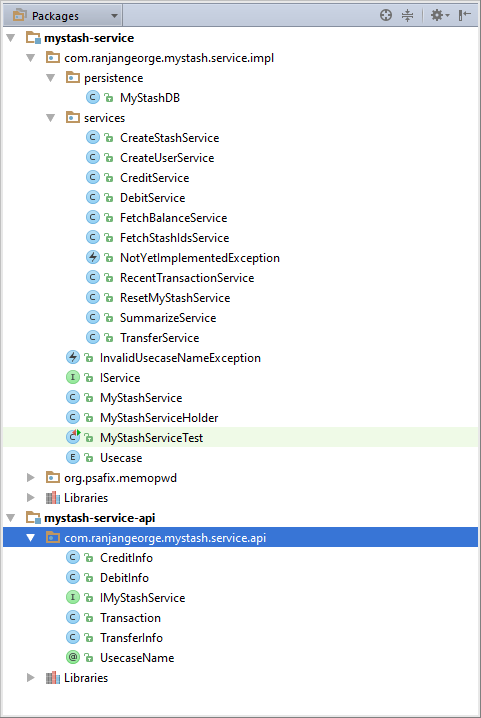
Yes, some clean-up, some package definitions, separated the API from the implementation, etc.
All seems to be well and good? At least at a high level? Before I go further about MyStash, I am going to digress a little bit for some analogies.
Your better half, whoever that may be – could be just your roommate – gives you a list of things to buy from the super-market – and lucky you, you live next to one of those giant warehouse like stores – a Mega Mart of sorts, where you can get everything under the sun.
How would you go about buying the stuff? Some ground rules and assumptions first:
- You are visiting it for the first time
- You are not like my wife and I, interested in every aisle although we don’t need any of it
- You are there to buy the stuff on the list
- The list is fairly simple with a couple of items – so easy that you have memorized it
- And lastly, we are not trying to solve the traveling salesman problem – trying to figure out the exact aisles to navigate – keep it simple, and lets hope the store signs (hint!) have solved that problem for us
So you enter this store, how would you go about buying the stuff? Say, first you need to buy some veggies for a delicious salad. You would look for signs that help you navigate to the food section of the store and finally get you in front of the rack of veggies – thank god for the signs, else you would have been lost. You look at all the stuff, presented with neat little labels, telling you the names of some weird veggies and how expensive they are and easily locate what you are looking for. You pick up the stuff you and go to the designated counter, right next to the rack (how very convenient and thoughtful) for weighing some of them out. Sometimes you have a guy who helps you out with all the weighing and sometimes to you have to do it yourself.
Next up, some wine. Simple, look for the (self-evident and very visible) signs that lets you navigate to the wine section – ah they are having a tasting session – how nice! Beers are all stacked together in packs of 6 and 12, the scotch nicely lined up based on where they are from and so are wines! You locate the six pack of “Leffe Blond” that you are looking for (wishful thinking that it is going to be available in Hyderbad, INDIA). Whats next?
Back to software – that’s what’s next! Lets take a look at IMyStashService as it stands after the new stuff that I have added in:
public interface IMyStashService {

    @UsecaseName(value = "createUser")
    void createUser(String emailId, String name);

    @UsecaseName(value = "credit")
    void credit(CreditInfo credit);

    @UsecaseName(value = "debit")
    void debit(DebitInfo debit);

    @UsecaseName(value = "fetchBalance")
    double fetchBalance(String stashId);

    @UsecaseName(value = "fetchRecent")
    List<TransactionInfo> fetchRecentTransactions(int fetchCount);

    @UsecaseName(value = "newStash")
    void newStash(String name, String description);

    @UsecaseName(value = "transfer")
    void transfer(TransferInfo transfer);

}
Does it feel like the nice little, very organized super-market with all its easily accessible sign-boards we just visited? At least it feels like the nice little labels (read method signatures) on the veggies are there – thanks to some level of good naming we followed. I just ordered the methods alphabetically to emphasize the point I am hoping I am making – who’s to say what order the methods in an interface finally land up to be after a bunch of developers have edited it and added and removed stuff from it.
You may say, its just 9 use-cases or methods, that’s too small to worry about – kind of like the shopping list you memorized. Hopefully you are not saying that and realize that its just the beginning. My wife has started baking these days and expects this to evolve into an app that she can use for her accounts in her baking endeavor. And she, am sure will have a ton of new use-cases that need to be added to support what she needs.
So as I add more use-cases, my main consumer facing interface is loosing its sheen – the big talk of ensuring it being intuitive to use, is wearing away. So how do we keep this from happening?
Interestingly or UN-interestingly simple enough – become a well organized super market! Separate out or segregate the methods into interfaces (Interface Segragation – the I in SOLID) that a client would use together – just like the wines were placed in the wine section for those coming in to buy wine and the veggies and the weighing counter were placed in the food section of the store for those coming in to by veggies – have dedicated aisles for the transaction methods and the administrative methods.
Another way to picture this principle is SRP applied to interfaces!
So how about, for starters, splitting IMyStashService:

Incidentally, I think I would go with a further split of the IAdminService to IStashService and IUserService as shown below:

Me, my wife and kids as the people who spend money would use the – ITransactionService. My wife and I who actually own the stashes would create and administer our stashes through – IStashService. Me as Administrator would use the IUserService to add/remove/disable users based on how they are behaving :-).
 Ranjan George